
🤖NPCs

circle-exclamation

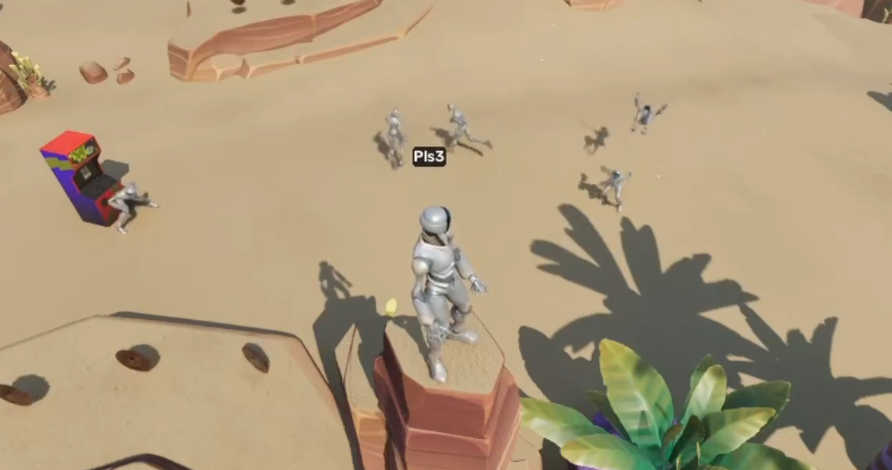
We have some systems in place in the ODK to handle creating NPCs at scale, and configuring their behavior. The classes are all in BP, so feel free to extend them, or swap them out with your own implementations if desired!

NPC Spawning

Initial setup

The flow for spawning NPCs using our NPC Spawning system is as follows:

  • Ensure your World Settings has the BPM_ODK_NPCSingleton in its AdditionalSingletons list. This is responsible for handling "spawn requests", and managing the NPC capacity your world has

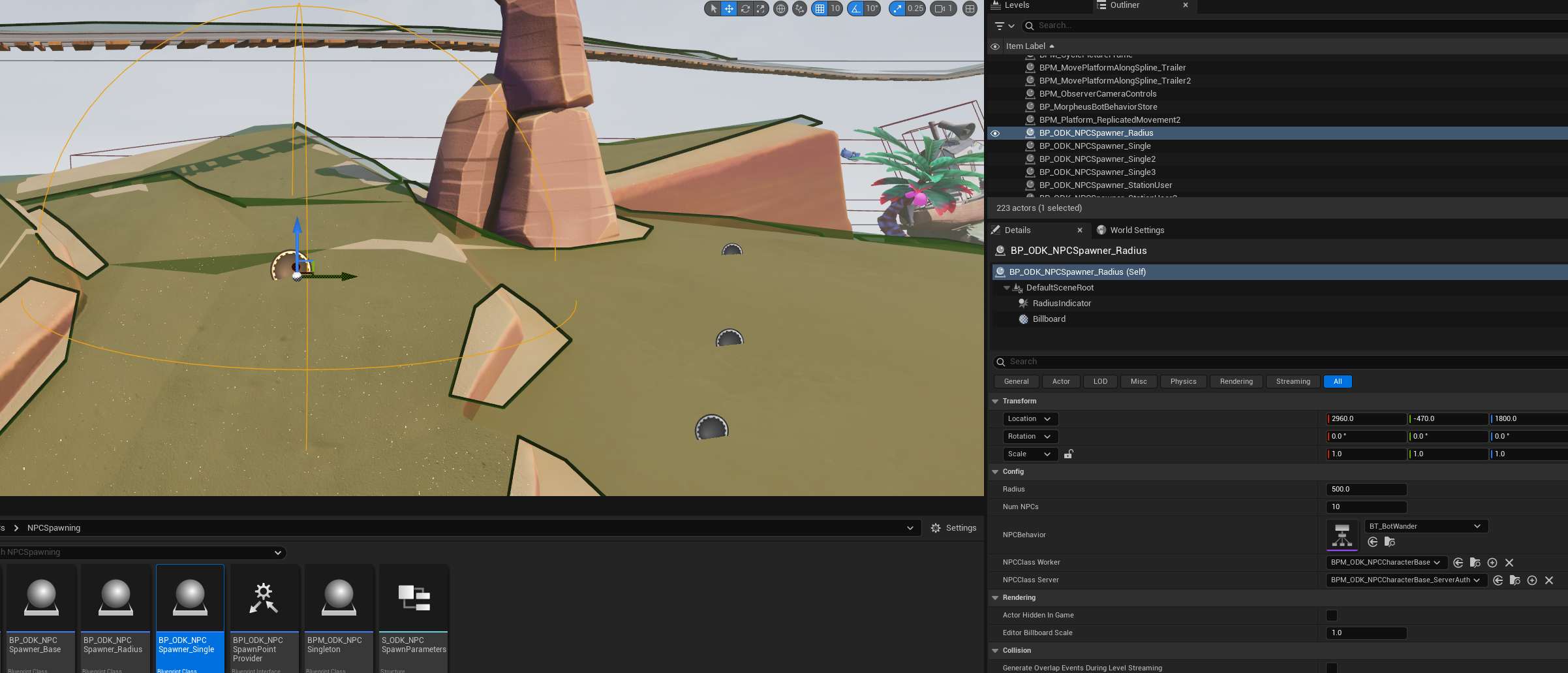
  • Place classes extending BP_ODK_NPCSpawner_Base into your level (or Always Loaded sublevels). We have some pre-existing examples, such as:

    • BP_ODK_NPCSpawner_Single - spawns a single NPC at that location

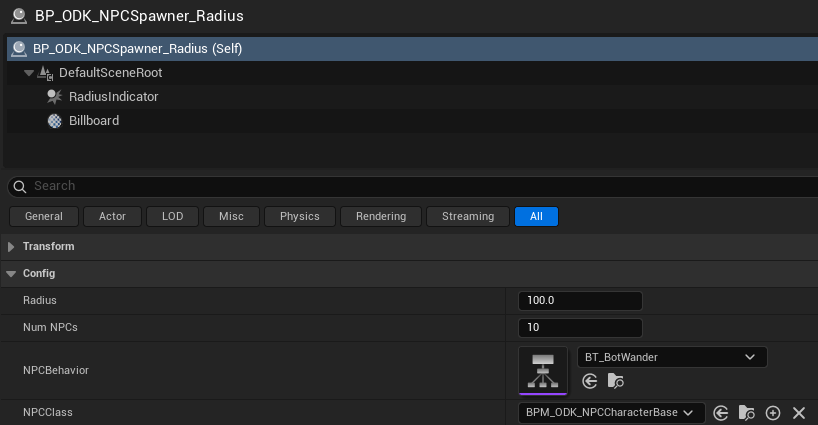
    • BP_ODK_NPCSpawner_Radius - spawns NumNPCs many NPCs within a Radius

    • BP_ODK_NPCSpawner_StationUser - same as the above, but spawns NPCs that are configured to use NPC Stations.

Using Worker Clients

If you want to use Worker Clients (docs pending), you will need to set them up:

  • First, you will need to configure a Trusted Client Api Key.

    • This is set in your Editor Preferences -> Sign In Settings

    • The value for your trusted client API key is in your dashboard (admin -> API Keys), if your project has one. If not, you will be unable to use worker clients.

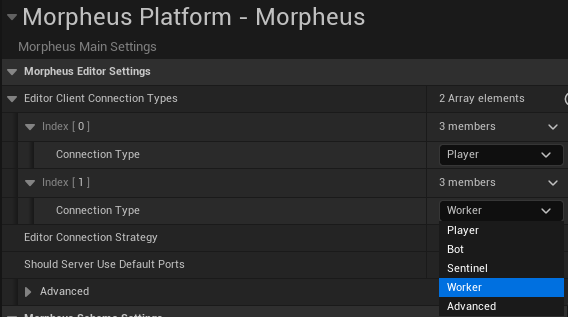
  • Then, when playing in editor, you can set one of the clients to run as a Worker Client through Editor Preferenecs -> Morpheus -> Editor Client Connection Types

    • Each entry in the list dictates which connection type will be used for the client of that index. Each will default to Player (meaning a human controlled character), but you can set one to be Worker, to use a Worker Client in-editor.

  • Then, when playing in editor, increase the Number of Players, to include one of the above Worker Client connections.

  • If everything is configured correctly, you should see your Worker Client's window get past the "Waiting for Sign in" stage, but you can ignore the window otherwise.

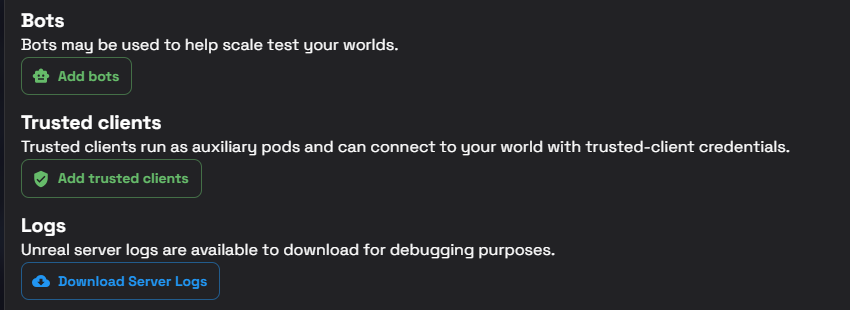
  • In a deployment, provided you have the appropriate permissions, you can configure the number of trusted clients (defaulting to worker clients) for your deployment via the dashboard:

Live config

There are two Live Config flags that can be modified, to configure the NPC spawning:

In Project config:

  • ODK.NPCs.MaxNPCsPerWorker: The number of NPCs each Worker Client can support. The BPM_ODK_NPCSingleton handles allocating NPCs to the worker clients according to their capacity.

  • ODK.NPCs.MaxServerNPCs: The number of NPCs the server can support. If there is insufficient capacity on the connected Worker Clients (if there are any), NPCs will instead be spawned on the server.

circle-exclamation

Configuring your NPC Spawners

Each NPC spawner that can be placed in the world have a few common parameters to be configured:

  • NPCBehavior: The behavior that the NPCs spawned from that spawner will run. For more details, see NPC Behaviors

  • NPCClass: The Morpheus Actor spawned by the NPC Spawner. All NPCs spawned will use this class. In most cases, this can be left the same, but if you want bespoke NPC types, you can change this.

Advanced: Configuring NPCs to run differently on Worker Clients or the Server

The hope is that in most cases this won't be required. However, there are some quirks to note when spawning your NPCs on the server or a worker client:

  • If the NPC is spawned on the server, there will be no "authoritative client". The pawn will be controlled by the server, which will have authority over its "client authoritative" properties.

  • This means that MorpheusActor::GetAnyLocalConnectionsHaveClientAuthority branches will run fine on either machine (if it's as worker-controlled, this will be true only for the authoritative worker client, if server-controlled, this will be true on the server)

  • However, any logic that explicitly checks whether it is running on the server or client will behave differently. i.e. if you check "is on client" to restrict certain behavior that you want running on the authoritative machine, then the server won't run it, even if it is the machine that's meant to be controlling your NPCs.

  • Similarly, the MorpheusActor::SwitchMorpheusAuthority node will return Server on the server, even if it also has client authority. So this node may cause issues if you want logic that is run on the authoritative machine, server included.

If your NPCs depend on logic that can't be structured in a way where it can run the same with either client or worker control, you can configure your NPC spawners accordingly:

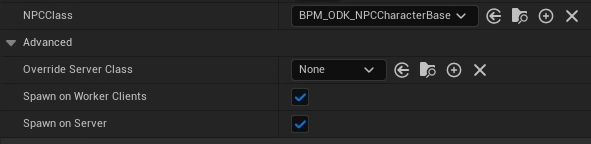
  • NPCClass is the class used by default for NPCs spawned either on the server or worker clients.

  • OverrideServerClass - if this is non-null, then any NPCs spawned on the server will use this class instead. You can use this if you want to give them alternative logic to worker NPCs.

  • Is SpawnOnServer is false, then the spawner will not attempt to spawn NPCs on the server. (You can use this to e.g. only spawn NPCs on the workers, requiring workers to be available)

  • Is SpawnOnWorkerClients is false, then the spawner will not attempt to spawn NPCs on worker clients. (You can use this to e.g. only spawn NPCs on the server)

Requesting NPCs

The logic that the NPC Spawners call automatically, is accessible to be called elsewhere too. If you get the BPM_ODK_NPCSingleton, you can request that NPCs be spawned.

  • Server_SpawnNPCs is a Server RPC request to spawn NPCs - it can be called from the server, or any client.

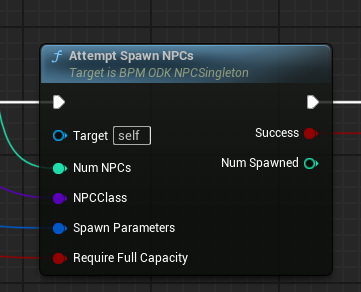
    • If you are on the server, you can also call AttemptSpawnNPCs instead, which returns Success and NumSpawned, allowing you to more tightly handle what happens if there was not sufficient capacity to spawn all the desired NPCs.

    • NumNPCs is the number of NPCs of the provided type you want to spawn.

    • RequireFullCapacity controls whether to allow spawning a fraction of the NPCs, if there is not capacity for all of them, or whether to fail the request, to try again later. (e.g. if there is only capacity for 6 NPCs, but you want to spawn 10, should it spawn 6 now, or wait until a Worker Client connects, and it can spawn all 10?)

    • NPCClass is the Morpheus Actor class of the NPC you want to spawn. If you want different types of NPCs, you can change this freely.

    • SpawnParameters contains two fields:

      • NPC Behavior: The Behavior Tree that your spawned NPCs will run (see NPC Behaviors)

      • SpawnPointProvider: Generally pass in the caller. Needs to implement the BPI_ODK_NPCSpawnPointProvider interface

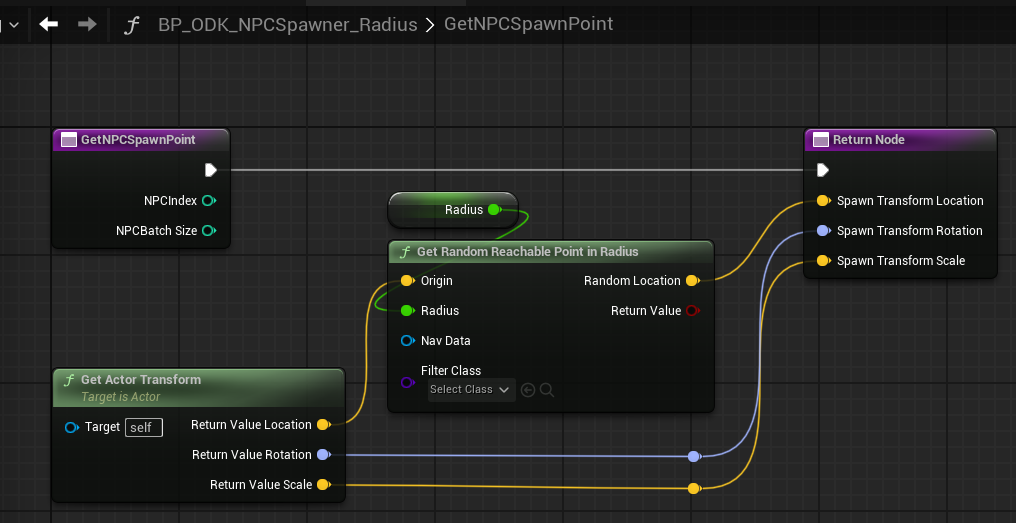
        • The NPC Singleton uses this to determine where to spawn the NPCs, calling GetNPCSpawnPoint

          A basic GetNPCSpawnPoint implementation, used by the BP_ODK_NPCSpawner_Radius - spawn NPCs on the navmesh, in a radius around the spawn point actor.
        • The Spawn Parameters are replicated to the Morpheus Actor, so can be used to provide additional information to the spawned NPCs on what to do. (e.g. if you configured a spawner where you wanted every NPC spawned from that spawner to wear a hat, you could make the NPCs check their spawn point provider to determine what hat to wear)

NPC Behaviors

Each NPC Spawner has an associated NPCBehavior that any NPCs spawned from it will run. This is a Behavior Tree, that will control what the NPCs will do. This can be freely configured, or swapped out, if you want your NPCs to perform different behavior.

An example behavior tree: BT_BotWander - the NPCs will pick random locations nearby to them, and move to them. Causes the NPCs to wander randomly within the level, assuming navigation is in place.

Stations

For some more complex behavior, we have the "NPC Stations" system: the NPCs will move between "stations" placed in the world, and perform actions according to the station (e.g. performing an emote reaction to a point of interest).

For more details, see NPC Stations

Last updated