> For the complete documentation index, see [llms.txt](https://docs.otherside.xyz/llms.txt). Markdown versions of documentation pages are available by appending `.md` to page URLs; this page is available as [Markdown](https://docs.otherside.xyz/odk-docs/odk-plugin/emotes.md).
# Emotes
Emotes allow players to express themselves in game with a various animations.
When interacting with emotes in the ODK, the main asset to interact with is the `BPMC_ODK_EmotesComponent`. This is a component on the ODK morpheus player character `BPM_ODK_PlayerCharacterBase`.
### Defining Emotes
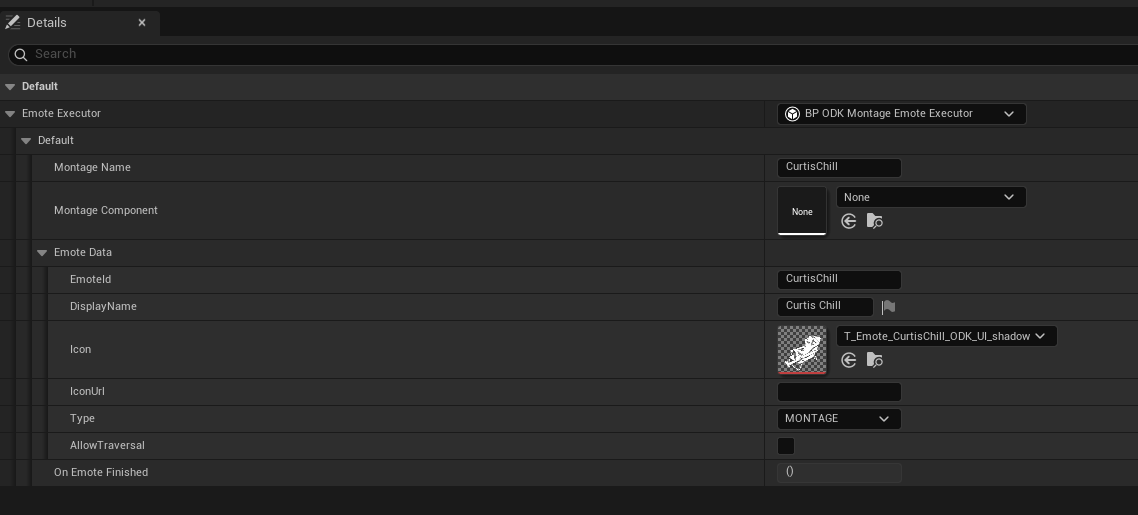
You can define an emote by creating a new PDA\_ODK\_Emote asset.
**Emote Executor -** This is an instanced object in which you can configure your emote. The executor object itself will contain logic as to how an emote should behaive. This allows emotes to have varied and complex behaivour supporting things such as "feels" flipbook emotes and coop emotes.\
\
All emote executors must contain the following data.\
\
**DisplayName** - Display name used in UI\
**EmoteId** - Used to help unlock emotes via token ownership. The token metadata will specify the emote id that it represents ownership of.\
**Icon/IconUrl** - Icon used in UI, only one of these needs filling in.\
**Type** - An enum that lets code categorise emotes. Currently the types we support are: STANDARD and COOP.\
**AllowTraversal** - Whether the emotes should continue playing even if the player starts moving.
Currently, emotes come in three flavours: MONTAGE, COOP, FLIPBOOK or PICTURE. MONTAGE emotes simply play an animation on you player character. Coop emotes allow you to play animations synced with another player character. FLIPBOOK emotes allow the player to display a short 2D animation. PICTURE emotes allow the player to display a simple image. The way these are handled are very different. The emote executor allows for completely different behaviors to be executed by different emotes whilst being handled the same way in the reset of our logic.
### Starting and Stopping Emotes
`PlayEmote` and `CancelCurrentEmote` can be used to start and stop emotes regardless of whether they are standard or coop emotes.
---
# Agent Instructions
This documentation is published with GitBook. GitBook is the documentation platform designed so that both humans and AI agents can read, navigate, and reason over technical content effectively. Learn more at gitbook.com.
## Querying This Documentation
If you need additional information that is not directly available in this page, you can query the documentation dynamically by asking a question.
Perform an HTTP GET request on the current page URL with the `ask` query parameter, and the optional `goal` query parameter:
```
GET https://docs.otherside.xyz/odk-docs/odk-plugin/emotes.md?ask=&goal=
```
`ask` is the immediate question: it should be specific, self-contained, and written in natural language.
`goal` is optional and describes the broader end goal you are ultimately trying to accomplish on behalf of the user. GitBook uses it to tailor the answer towards what is most useful for that goal.
The response will contain a direct answer to the question and relevant excerpts and sources from the documentation.
Use this mechanism when the answer is not explicitly present in the current page, you need clarification or additional context, or you want to retrieve related documentation sections.