# User Guide - Crowd Anim Blueprint

## Setting up the Animation Blueprint (ABP) <a href="#setting-up-the-animation-blueprint-abp" id="setting-up-the-animation-blueprint-abp"></a>

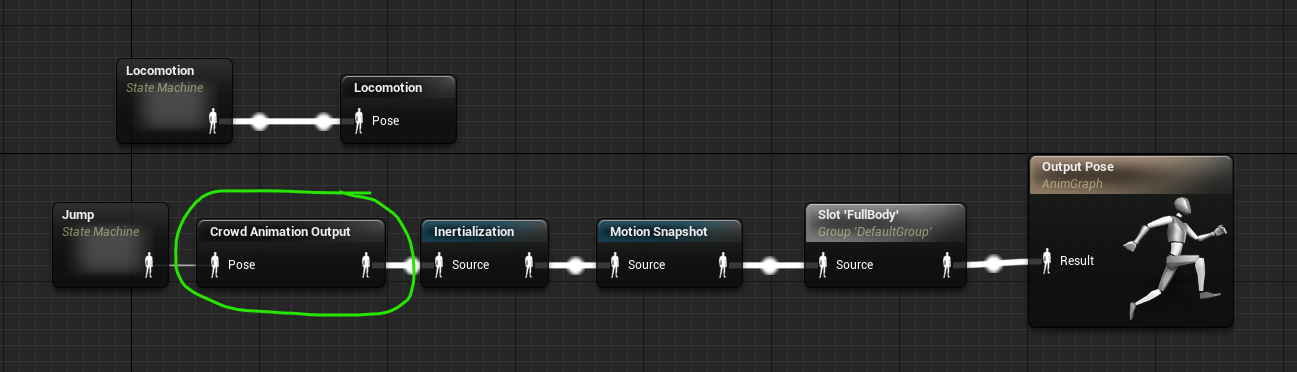
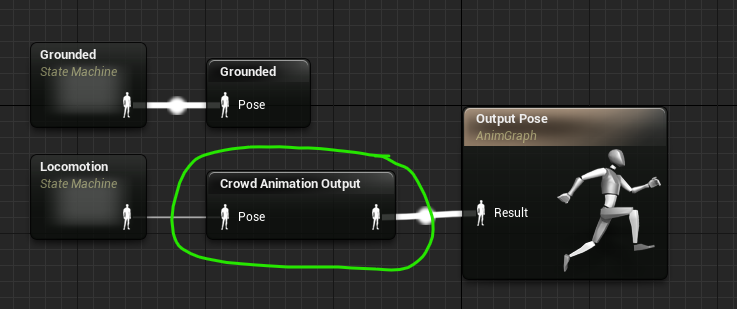
To enable Crowd Anim Blueprint for your ABP, you must add the `Crowd Animation Output` node at the *end* of your ABP, typically before the `Output Pose` node, as shown below. Everything before this node will be compiled by Crowd Anim Blueprint automatically when the ABP is compiled. If there are no errors, this is all that is required and you’ll be ready to use your ABP with Crowd Anim Blueprint.

<figure><img src="/files/gc1wogoCxPztZqcafVnK" alt=""><figcaption><p>Typical usage of the Crowd Animation Output node to enable Crowd Anim Blueprint for an ABP</p></figcaption></figure>

In some cases, you may have ABP nodes that apply unsupported logic to the final ABP pose, as shown below. In this case, make sure to put the `Crowd Animation Output` node before the chain of unsupported pose nodes, and Crowd Anim Blueprint will ignore them

<figure><img src="/files/xsIyFckXjmJzD0AwQ5ML" alt=""><figcaption><p>The Crowd Animation Output node placed before the chain of unsupported nodes</p></figcaption></figure>

{% hint style="warning" %}
In all cases, you should **never** have more than one `Crowd Animation Output` node in a single ABP
{% endhint %}

## Supported ABP Nodes <a href="#supported-abp-nodes" id="supported-abp-nodes"></a>

Not all ABP nodes are supported by the Crowd Anim Blueprint compiler. The reference page [here](/platform-documentation/creation/unreal-development/features-and-tutorials/the-animated-crowd/crowd-animation/crowd-anim-blueprint/reference-guide-abp-nodes.md) lists nodes and features that are currently supported by Crowd Anim Blueprint. It also details any subtle behaviour differences there might be between an Unreal Actor's use of an ABP node and the crowd version of the same ABP node.

## Resolving errors in the ABP <a href="#resolving-errors-in-the-abp" id="resolving-errors-in-the-abp"></a>

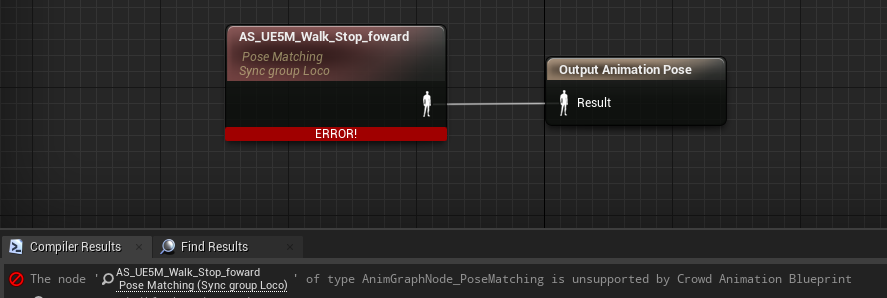
In some cases, your ABP may not compile anymore with Crowd Anim Blueprint enabled. When this occurs, you will get an error in the ABP compiler window with details on why. This will most likely be because you use a node or some configuration that is not supported by Crowd Anim Blueprint, as shown in the image below.

<figure><img src="/files/QO5TJUDLrtURQQ67FP7y" alt=""><figcaption><p>Example of an ABP that no longer compiles under Crowd Anim Blueprint due to the usage of an unsupported node</p></figcaption></figure>

To work around the issue, you can of course simply stop using the offending node in your ABP. If however you'd still like to use the functionality on your Unreal Actors, but do something different for crowd members, there are a pair of nodes available for this purpose.

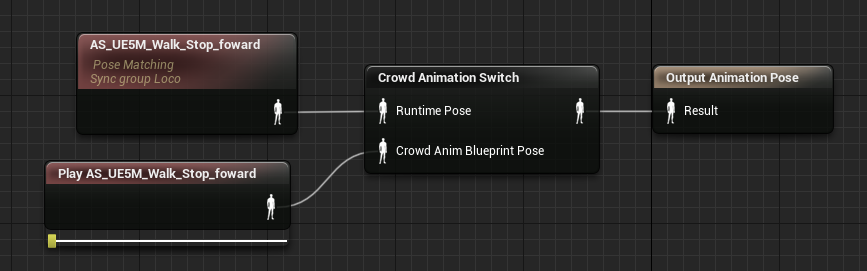
Using a `Crowd Animation Switch` (for AnimGraph errors) or `Crowd Animation Value Switch` (for transition logic errors) allows you to create two paths, one for the crowd and one for runtime.

* You can then use the offending node as normal for the runtime route, which normal actors will use
* In the Crowd Anim Blueprint route, you can then provide alternative ABP nodes that do not utilize offending nodes
* The image below has an example of using this node to remedy the error

<figure><img src="/files/mhdzJwCSERE8Prqwq13R" alt=""><figcaption><p>The ABP now compiles again under Crowd Anim Blueprint, thanks to the Crowd Animation Switch node</p></figcaption></figure>

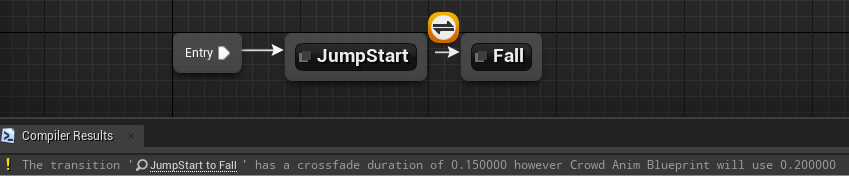
There may be cases where Crowd Anim Blueprint will compile your ABP correctly, but will ignore specific settings that it does not support, such as a custom crossfade duration on a transition. Since it would be annoying for Crowd Anim Blueprint to report these as warnings when there is nothing you can do to resolve them, they are instead reported as “verbose warnings” instead, which are hidden by default.

<figure><img src="/files/PTumXxeFr5zQMoFevKhQ" alt=""><figcaption><p>A verbose warning output by Crowd Anim Blueprint about the unsupported crossfade duration in the transition</p></figcaption></figure>

Verbose warnings can be enabled with the command below

`CrowdAnimBlueprint.VerboseCompilerWarnings 1`

## Optimizing the ABP for Crowd Anim Blueprint <a href="#optimizing-the-abp-for-crowd-anim-blueprint" id="optimizing-the-abp-for-crowd-anim-blueprint"></a>

While Crowd Anim Blueprint runs on the GPU and can execute at a much larger scale than a traditional ABP does, there is still a non trivial amount of work the system has to do. In some cases you may want to optimize your ABP to be more efficient for Crowd Anim Blueprint if you need to squeeze out some more performance.

These things will generally make your ABP slower to process by the system

* Lots of outgoing transitions from a single state
* Complex conditions in state transitions
* Lots of unique parameters
* Complex chains of pose blend operations
* Frequent use of "Use Cached Pose" node


---

# Agent Instructions: Querying This Documentation

If you need additional information that is not directly available in this page, you can query the documentation dynamically by asking a question.

Perform an HTTP GET request on the current page URL with the `ask` query parameter:

```
GET https://docs.otherside.xyz/platform-documentation/creation/unreal-development/features-and-tutorials/the-animated-crowd/crowd-animation/crowd-anim-blueprint/user-guide-crowd-anim-blueprint.md?ask=<question>
```

The question should be specific, self-contained, and written in natural language.
The response will contain a direct answer to the question and relevant excerpts and sources from the documentation.

Use this mechanism when the answer is not explicitly present in the current page, you need clarification or additional context, or you want to retrieve related documentation sections.