# Legacy HTTP Nodes

{% hint style="warning" %}
These HTTP Nodes are now deprecated and will be removed in a future release. Please migrate to the Send Http Request functionality described in the [Http Requests](/platform-documentation/creation/unreal-development/features-and-tutorials/web-services/http-requests.md) page
{% endhint %}

There are several HTTP nodes available for use that allow you to make JSON requests to APIs.

The following Blueprint Nodes are available for use:

* Http Get Json
* Http Post Json
* Http Put Json
* Http Patch Json
* Http Delete

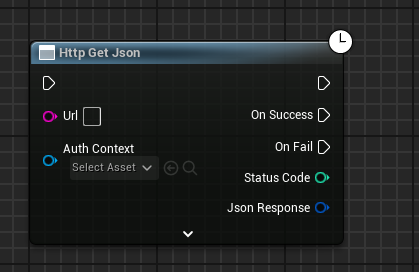
All nodes have the following common pins:

* `Url` - target url you are sending the Http request to
* `Auth Context` - local Morpheus Actor/Morpheus Actor Component you wish to use to authenticate the request

And the following output pins are common:

* `On Success` - control flow invoked when the request completed successfully
  * usually with a 200 Status Code
* `On Fail` - control flow invoked when the request failed
* `Status Code` - status code of the HTTP response
  * If zero, we usually had a problem sending the request
* `Json Response` - a Json Object Structure of the data that was returned
  * only valid upon success, and if the API returned JSON data

If you expand the node's properties, you get access to more advanced options:

<figure><img src="/files/aRekFQi7QkJrBHDcK7GG" alt=""><figcaption></figcaption></figure>

* `Headers` - a String-String Map of additional headers to add to the request
* `Scope` - Adds any MSquared scoping headers
* `Include Delegated Auth Token` - See [Authentication](#authentication)
* `Retry Settings` - Settings related to automatically retrying requests that fail with a potentially transient error (e.g. 504: Gateway Timeout)
  * The retry settings includes configuration of how it should retry requests (if `Enabled`).
  * `MaxAttempts` - The number of retries before giving up. (If < 0, will treat as unlimited retries)
  * The retries use an exponential backoff with jitter approach, where it will wait randomly between `BackoffInterval` and `MaxBackoffInterval` for each retry, increasing the average wait timefor each attempt..
* `Max Redirect Count` - The maximum number of redirects that are allowed for this request.

### Http Get Json

<figure><img src="/files/cvgSHB31PaL89dyjXvj4" alt=""><figcaption></figcaption></figure>

This node issues a simple GET request to a URL and parses the result as JSON.

### Http Post/Put/Patch Json

<figure><img src="/files/4w3lJEgct2C9qLsWcQfG" alt=""><figcaption></figcaption></figure>

These nodes are used to send data to a URL as JSON.

They each have a "Json" input pin that accepts a Json Object Structure.

If the API returns a JSON response it will be present on the Json Response pin.

### Http Delete

<figure><img src="/files/RkIuZMqqcAyLxy33lbCX" alt=""><figcaption></figcaption></figure>

This node issues a DELETE request to the url. It it not normal for a response to be returned.

### Urls

A url is a full https url for an external site. It cannot be any other scheme, eg: http, ws, ftp, etc - these will cause the request to fail.

### Authentication

When you provide an Auth Context to any of the nodes, you are providing a hint that the request requires authentication.

#### External APIs

If you are calling your own API you can require that a Delegated Auth Token is provided with the request. This token allows your external service to validate the identity of the caller as an MSquared user.

See the section on [Validating Identity](/platform-documentation/creation/unreal-development/features-and-tutorials/web-services/validating-identity.md) for more information.

#### Custom Authentication

If you need to use a custom authentication scheme, such as Basic auth or provide your own credentials. You can do this by adding your own headers to the request.

<figure><img src="/files/skF0F9qCAWx09M5Qfc9A" alt=""><figcaption></figcaption></figure>

To do this, you will need to make a Map of String/String and populate it with your own header values. Typically, you would use the key of `Authorization` for auth headers. The credentials you provide will depend completely on the api you are calling.

{% hint style="danger" %}
Be careful about embedding credentials into Blueprints as they will be available to anyone with your content. Storing your own credentials securely is out of scope of this tutorial.
{% endhint %}

### Scoping

If you add a Scope option the nodes will apply HTTP headers allow you to identify the current context in which the metaverse is running.

{% hint style="info" %}
If you need to know this, it is recommended that you select the **World** scope, as it contains the most useful information.
{% endhint %}

The following additional headers are added to the request:

<table><thead><tr><th width="296">Scope</th><th>Headers</th><th>Description</th></tr></thead><tbody><tr><td>None</td><td>N/A</td><td>No extra headers are applied</td></tr><tr><td>Organization</td><td>x-m2-organization-id</td><td>Applies the current Organization Id of the Metaverse</td></tr><tr><td>Project</td><td><p>x-m2-organization-id</p><p>x-m2-project-id</p></td><td>Applies the current Organization Id and Project Id of the Metaverse</td></tr><tr><td>World</td><td><p>x-m2-organization-id</p><p>x-m2-project-id</p><p>x-m2-world-id</p></td><td>Applies the current Organization Id, Project Id and World Id of the Metaverse</td></tr><tr><td>Launch Context</td><td><p>x-m2-organization-id</p><p>x-m2-project-id</p><p>x-m2-launch-context-id</p></td><td><strong>Deprecated</strong><br><br>Applies the current Organization Id, Project Id and Launch Context Id of the Metaverse</td></tr></tbody></table>


---

# Agent Instructions: Querying This Documentation

If you need additional information that is not directly available in this page, you can query the documentation dynamically by asking a question.

Perform an HTTP GET request on the current page URL with the `ask` query parameter:

```
GET https://docs.otherside.xyz/platform-documentation/creation/unreal-development/features-and-tutorials/web-services/http-requests/http-json-nodes.md?ask=<question>
```

The question should be specific, self-contained, and written in natural language.
The response will contain a direct answer to the question and relevant excerpts and sources from the documentation.

Use this mechanism when the answer is not explicitly present in the current page, you need clarification or additional context, or you want to retrieve related documentation sections.
