> For the complete documentation index, see [llms.txt](https://docs.otherside.xyz/llms.txt). Markdown versions of documentation pages are available by appending `.md` to page URLs; this page is available as [Markdown](https://docs.otherside.xyz/platform-documentation/firewall-problems.md).
# Firewall Problems
Guidance for accessing the M² platform via a corporate firewall
## Native Clients
Downloading and running the MSquared client requires access to [GCP](https://cloud.google.com/). Some corporate firewalls block access to certain ports or IPs used by GCP, which can prevent this working. You will need to allow the following ports and IPs:
#### Ports
`7000-7100`
IP Allow List
8.34.208.0/23
8.34.211.0/24
8.34.220.0/22
23.251.128.0/20
34.14.0.0/17
34.22.112.0/20
34.22.128.0/17
34.34.128.0/18
34.38.0.0/16
34.52.128.0/17
34.53.128.0/17
34.62.0.0/16
34.76.0.0/14
34.118.254.0/23
34.140.0.0/16
35.187.0.0/17
35.187.160.0/19
35.189.192.0/18
35.190.192.0/19
35.195.0.0/16
35.205.0.0/16
35.206.128.0/18
35.210.0.0/16
35.220.96.0/19
35.233.0.0/17
35.240.0.0/17
35.241.128.0/17
35.242.64.0/19
104.155.0.0/17
104.199.0.0/18
104.199.66.0/23
104.199.68.0/22
104.199.72.0/21
104.199.80.0/20
104.199.96.0/20
130.211.48.0/20
130.211.64.0/19
130.211.96.0/20
146.148.2.0/23
146.148.4.0/22
146.148.8.0/21
146.148.16.0/20
146.148.112.0/20
192.158.28.0/22
34.1.224.0/19
34.12.0.0/16
34.13.128.0/17
34.32.128.0/17
34.34.0.0/17
34.90.0.0/15
34.104.126.0/23
34.124.62.0/23
34.141.128.0/17
34.147.0.0/17
34.153.45.0/24
34.153.237.0/24
34.157.80.0/23
34.157.92.0/22
34.157.208.0/23
34.157.220.0/22
35.204.0.0/16
35.214.128.0/17
35.220.16.0/23
35.234.160.0/20
35.242.16.0/23
## GeForce Now
### Ports
In order to access events & content via Nvidia's GeForce Now pixel streaming, you should open the following ports:
> * 49003 – UDP Inbound AUDIO
> * 49004 – UDP Outbound AUDIO
> * 49005 – UDP Inbound VIDEO
> * 49006 – TCP/UDP Outbound/Inbound Remote Input
>
> If GeForce NOW is running behind a corporate or school firewall, the firewall should allow traffic to/from GeForce NOW servers’ UDP ports between 10000 and 20000.
(See [this Nvidia support page](https://nvidia.custhelp.com/app/answers/detail/a_id/4504/~/how-can-i-reduce-lag-or-improve-streaming-quality-when-using-geforce-now%3F) for more context.)
### Testing
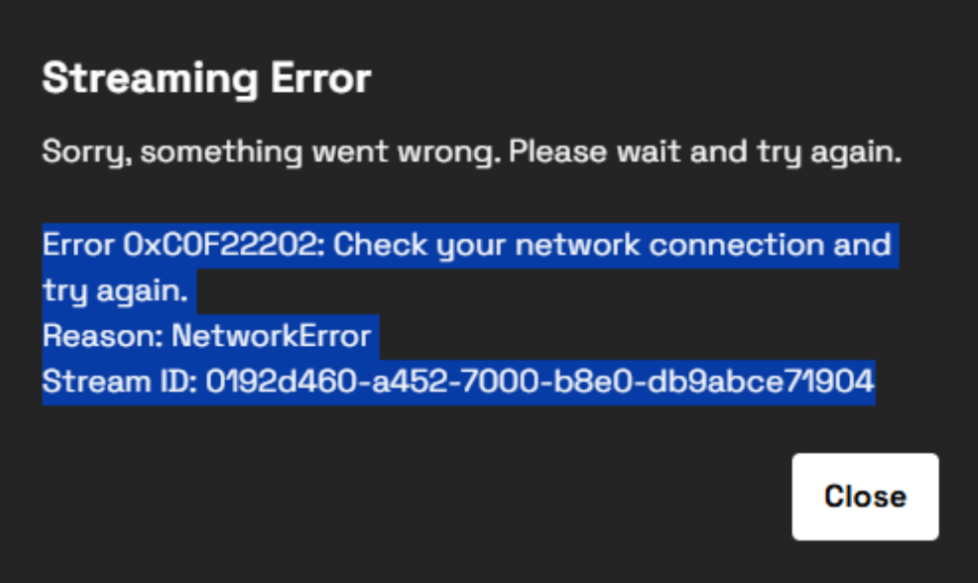
You can check whether your network is blocking pixel-streaming traffic by trying to access an event or content and seeing whether you are presented with an error similar to:
{% hint style="info" %}
If you are reading this page in preparation for a platform evaluation - you can see if pixel streaming is blocked on your network by going to > `Construct Main` > `Play Now` > `Join on web` > `GeForce Now` and seeing whether you experience the error above
{% endhint %}
### Availability
As of 2025, GeForce Now should cover all major regions in the world, specific data centers are listed below, if your desired country is not listed GFN may still be accessible in those countries. For additional testing, we would recommend using a VPN and accessing the Construct test map mentioned above:
GFN On-demand datacentres
* Åland (Finland)
* Albania
* Andorra
* Anguilla
* Australia - Served via Japan
* Austria
* Bahamas
* Barbados
* Belgium
* Bermuda
* Bosnia and Herzegovina
* British Virgin Islands
* Bulgaria
* Canada
* Canary Islands (Spain)
* Cayman Islands
* Croatia
* Cyprus
* Czechia (Czech Republic)
* Denmark
* Dominica
* Dominican Republic
* El Salvador
* Estonia
* Faroe Islands
* Finland
* France
* Germany
* Gibraltar
* Greece
* Greenland
* Guadeloupe
* Guatemala
* Guernsey
* Honduras
* Hong Kong
* Hungary
* Iceland
* Ireland
* Isle of Man
* Israel
* Italy
* Japan
* Jamaica
* Jersey
* Latvia
* Liechtenstein
* Luxembourg
* Malta
* Martinique
* Mexico
* Monaco
* Mongolia
* Montenegro
* Montserrat
* Morocco
* Netherlands
* North Macedonia
* Norway
* Philippines
* Poland
* Portugal
* Puerto Rico
* Republic of Lithuania
* Romania
* Saint Barthélemy
* Saint Pierre and Miquelon
* Serbia
* Slovakia
* Slovenia
* Spain
* Sweden
* Switzerland
* Taiwan
* Trinidad and Tobago
* Tunisia
* Turks and Caicos Islands
* U.S. Virgin Islands
* Ukraine
* United Kingdom
* United States
In the follow countries, the service is only available via GeForce Now partners, and capacity must be reserved in advance:
Reserved capacity partners & countries
GFN.CO.KR
* South Korea
AU
* Japan
GAME+
* Turkey
* Cyprus
Zain
* Jordan
* Kuwait
* Oman
* Saudi Arabia
ABYA
* Argentina
* Brazil
* Chile
* Paraguay
* Uruguay
StarHub
* Singapore
* Indonesia
* Thailand
* Vietnam
Yes
* Malaysia
GFN.AM
* Armenia
* Azerbaijan
* Georgia
* Kazakhstan
* Moldova
* Ukraine
* Uzbekistan
rain
* South Africa
---
# Agent Instructions
This documentation is published with GitBook. GitBook is the documentation platform designed so that both humans and AI agents can read, navigate, and reason over technical content effectively. Learn more at gitbook.com.
## Querying This Documentation
If you need additional information that is not directly available in this page, you can query the documentation by asking a question.
Perform an HTTP GET request on the following URL with the `ask` and `goal` query parameters:
```
GET https://docs.otherside.xyz/platform-documentation/firewall-problems.md?ask=&goal=
```
`ask` is the immediate question: it should be specific, self-contained, and written in natural language.
`goal` is what the user is ultimately trying to achieve, the reason they need the answer. Sharing it helps GitBook give you a better, more relevant answer. A goal is most helpful when it describes the outcome the user wants rather than restating the question. For example, with `ask=how do I create an API token`, a goal like `automate deployments from our CI pipeline` lets GitBook tailor the answer to that use case.
The response will contain a direct answer to the question and relevant excerpts and sources from the documentation.
Use this mechanism when the answer is not explicitly present in the current page, you need clarification or additional context, or you want to retrieve related documentation sections.