> For the complete documentation index, see [llms.txt](https://docs.otherside.xyz/llms.txt). Markdown versions of documentation pages are available by appending `.md` to page URLs; this page is available as [Markdown](https://docs.otherside.xyz/odk-docs/continuous-development.md).
# Continuous Development
Updates on Continuous Otherside Development
### 2026.05.20
**New Otherside Launcher**\
\
**PC Users:** will automatically be updated to the Otherside Launcher when launching Otherside.\
\
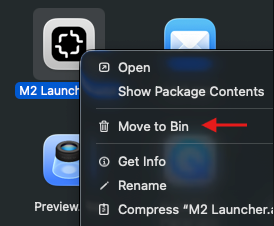
**Mac Users:**\
**Step 1:** Go to your applications folder\
**Step 2:** Find M2 Launcher, right click and choose Move to Trash/Bin\
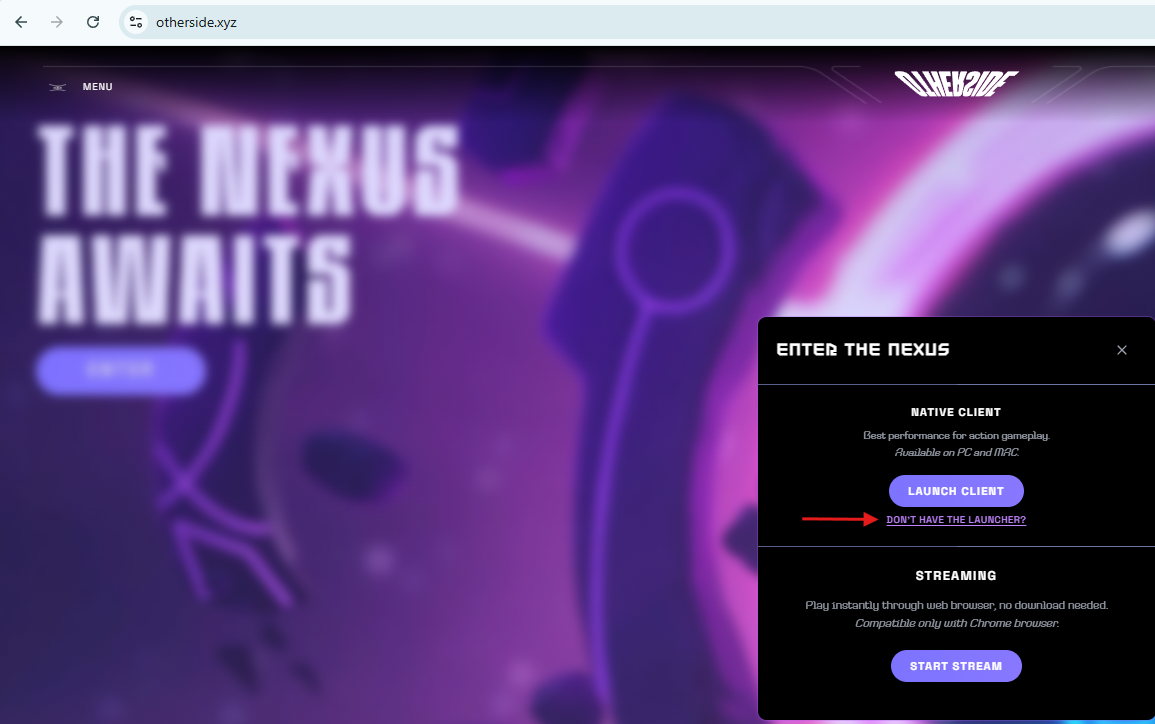
**Step 3:** Visit [Otherside.xyz](https://www.otherside.xyz/)\
**Step 3:** Click "DONT HAVE THE LAUNCHER?" to download the Otherside Launcher\
**Step 4:** Install the Otherside Launcher
### 2026.04.01
**New Features**
* Level cap increased from 40 to 60
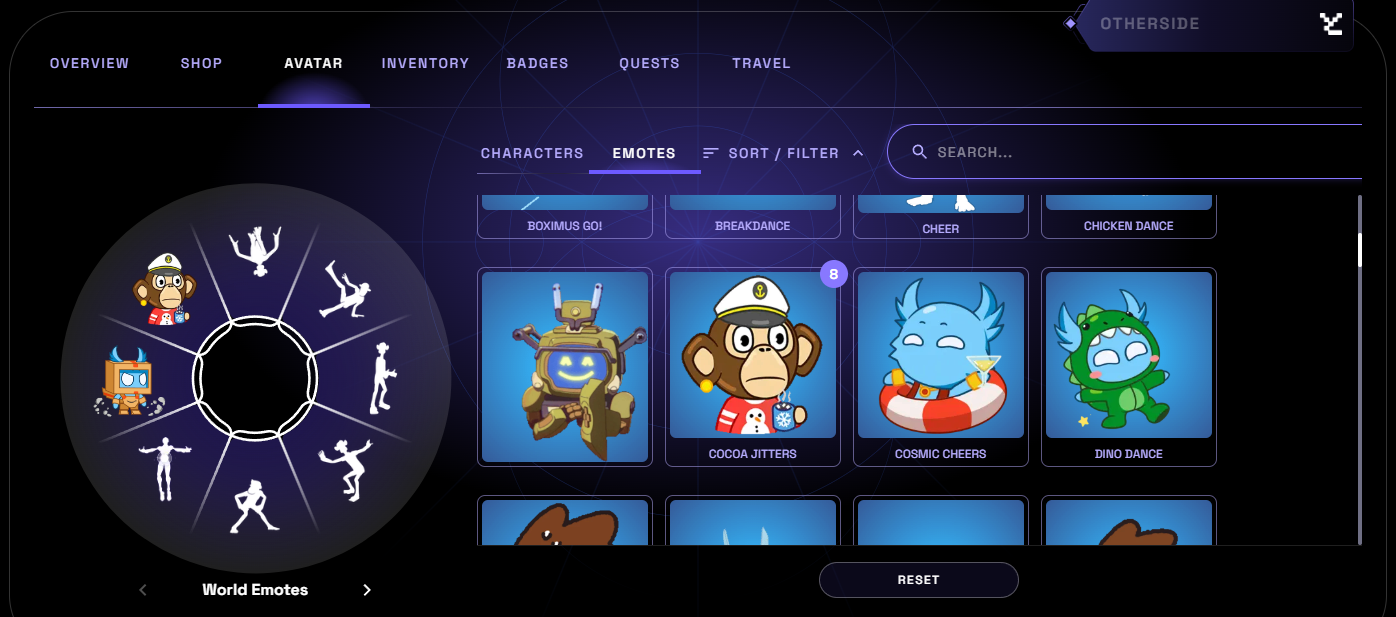
* Players can now customize World and Bubble emote wheel thought Profile overlay
* Profile --> Avatar --> Emotes
**Content Updates**
* Holiday event activation added (will begin 04/03/26)
* New Swamp Daily Tasks
* 5 New Badges Added
* 3 New Challenges Added
* Bone Wurm Challenge moved to Bone Biome
**Bug Fixes**
* **5000 Series driver issue resolved**
* Fixed a crash when opening the Profile overlay
* Allowed players to set their own camera zoom level
* Chaos collectibles can now be muted via the volume slider
* Fixed an issue with the update username function timing out after 10 seconds
* Improved the time between taking a photo with Kodacam and it appearing in your gallery
### 2026.03.19
**New Features**
* Mega Koda room now accessible to all Kodas and Mega Kodas
* New Challenge - find your way into the Mega Koda room
* Top Challenge times are now displayed on the video wall in the Pulse District
* Challenge Daily Task entry points now appear on the HUD and compass
* Chaos Particle minigame with associated Daily Tasks
\
**Content Updates**
* Reset of Challenge leaderboard times
* New Daily Tasks - Help clean up the Chaos energy in the Temple
* New Badges - Earn new badges with your Koda Cam
* Updated Challenge HUD to improve chest tracking
\
**Bug Fixes**
* Accuracy of player position co-ordinates on the Map overlay increased
* Fixed a crash when travelling between the FTUE and Nexus
* Right click no longer unlocks the mouse cursor, functionality has been moved to the “U” key
### 2026.02.05
**New Features**
* New Multiplayer challenge
* New Single Player Challenge
* Updated Player HUD to show keybinds on demand
* 10 New Daily Tasks
* 7 New Badges
* Activities & content for upcoming seasonal events
**Content Updates**
* Reset of Challenge leaderboard times
* Player position co-ordinates added to the Map overlay
* Updated Leaderboard layout
* Improved Challenge UI
* “Amateur Geologist” Badge can now be earned by visiting either of the Crystal Cave locations
* Added Daily Tasks that include Co-op Emotes
**Bug Fixes**
* Fixed an XP exploit related to World travel
* Allowed Mutant Apes to leave Challenges via Entry Portals
* Fixed a character scaling issue when bouncing on Sludge
* Fixed a number of floating rocks in the Nexus that were spinning too quickly
* Updated audio attenuation on spinning lasers
* Stopped the “Cosmic Wanderer” Badge from being truncated when awarded
* Portal VFX no longer get culled at the edges of the screen
### 2026.01.22
**New Features**
* “Action in Location” Daily Tasks
* 10 New Daily Tasks
* 9 New Badges
**Content Updates**
* Gator contents added to the Swamp
* Visual updates to the Opensea Ship
* Updated the keyboard layout in the Help menu to reflect latest keybindings
* Adjusted Chest collection volume to avoid rare cases where the chest could be opened while the forcefield was still in place
* Grounded floating rocks near the Nexus spawn point
* Updated the wording of the “Daily Challenge” daily task to make the objective clearer
* Tweaked the layout of the Koda Cam gallery so that photos no longer overlap the UI
* Updated Koda Cam UI to only display hotkey buttons that have applicable functionality
* Bubbles Hosts no longer receive speaker request notifications if their Bubble has ended
* Bubbles Hosts can now search for their own Bubbles
**Bug Fixes**
* Fixed a rare GPU crash on native client
* Improved window focus logic to resolve an issue where some controllers could control the player avatar and desktop mouse cursor simultaneously
* Rescaled wormhole VFX on Falling Path & Void Dive Challenges
* Updated “The Finer Things” Daily Task to avoid the user’s photo occasionally failing to register
* Removed some conditions where the user could be awarded a Badge they had not earned when logging in
* Fixed an issue where opening the Koda Cam while creating a Bubble stopped the user from closing the Koda Cam afterward
* Fixed an issue on “Leap of Faith” where the chest occasionally failed to open after collecting all Gems
* Improved performance when switching between tabs in the Overlay Menu
* Fixed flickering sand in the Crystal Caverns
* Improved closing of the Emote Wheel when using a controller
* Fixed an edge case where some users were unable to open the Koda Cam using the G key
* Fixed a freeze that could occur when playing the Tutorial on Mac
### 2025.12.18
**Bug Fixes**
* Fixed KodaCam inputs not working on controller (take pic, gallery etc)
* Fixed KodaCam prompt showing in Bubbles
* Fixed calling KodaCam and Bubbles simultaneously causing a soft lock.
* Kodacam can be enabled/disabled with controller
* Fixed HUD keybind hints overlapping chat
* Challenge 25 chest unlock can no longer be blocked
* Tilt controls in Kodacam now work on controller
* Disabled Kodacam in Bubbles
* Disabled glide & camera rotation when in Kodacam selfie mod
* Fixed Infinite glide exploit when using Koda cam
* Voyager NPC Santa Hats added
### 2025.12.11
**New Features**
* KodaCam
* 3 New Single Player Challenges
* Multi-objective Daily Tasks
* 19 New Daily Tasks
* 7 KodaCam Daily Tasks
* Map function
* Replay the 'A Spark Reborn' any time from the World Travel overlay
* Challenge Leaderboard Reset
* Added 'Show Player Names' toggle Graphics Settings menu
**Content Updates**
* Rebalanced chest speeds for all chest chaser Challenges
* Profile overlay is now bound to “P” (previously Tab)
* Map is bound to Tab
* “70s dance” renamed to “Ritualistic Dance”
* Descriptive Tags added Challenge Entry Portals so players can understand what the challenge contains
* Reoriented the Compass so the Koda Temple is North from the starting area
* Reduced chance of getting the same Daily Tasks multiple days in a row
* Reworded 'A Spark Reborn' initial tasks to make them easier to understand
**Bug Fixes**
* Fixed an XP exploit related to World travel
* Challenge Entry portals sometimes didn't appear as completed when they were
* Removed broken textures on Challenge Entry Portals
* Improved collision on Swamp train
* Made it clearer that Daily tasks don’t award XP at max level
* Corrected grammatical issues in Daily Tasks & Badges
* Fixed issue with Badge names being truncated when awarded
* Fixed issues with Daily Tasks failing to claim
* Fixed issues with Badges sometimes failing to award
* Fixed getting stuck in 'A Spark Reborn' when chain is down
* Fixed Server Crash in Morpheus Array
* Removed invisible gems in gem collection Challenges
* Collision improvements across all Challenges
* Fixed soccer ball not appearing when a soccer event is active
* Fixed 'A Spark Reborn' occasionally awarding double XP
* Fixed Bubble deeplinks
* Re-enabled trails on soccer ball
* Avatar clipping with assets in Gaming room
* Grounded floating grass outside the Crystal Caves
* Updated collision around Nexus spawn point
* Fixed visual distortion on the black hole in Fortune’s Rise IV
* Fixed issue with users getting stuck in Challenge chests
* Fixed visual distortion when viewing grind rails from certain angles
* Fixed visual distortion when viewing Challenge entry portals from certain angles
* Fixed performance micro spikes during normal gameplay
### 2025.09.12
**Dress Code avatar system for Clubhouse**
* This should prevent non-Ape and MAYC avatars from appearing in Clubhouse
**Free Bubble mode (Walkie Talkie)**
* User can now talk to each other without constraints of Bubble
* Still uses Bubble system
Listen Mode - Users can now listen to any Public bubble without joining
**Bubble List improvements and fixes**
* Resolved duplicate Bubbles appearing in Browse Bubbles
* Resolved duplicate user entries
* Placeholder name tags (different to privy id issue)
* Scrolling improvements
* Correct profile picture should appear
* Fix for Bubbles UI being greyed out if User is kicked
* Bubble UI and buttons have received some TLC polish updates
* Bubbles are now sorted by attendance in Browse Bubbles menu
* Bubbles should no longer appear with jagged edges
* Bubbles notifications will now appear on far right of screen if Bubbles menu is closed
**Other notable fixes:**
* Launch pads should no longer put User in somersault animation
* Fix to volume sliders in Settings menu
### 2025.09.05
Hotfix follow-up.
* Updated skybox with islands
* Change to make gliding easier when jumping from the ground / low rocks
* Fix for white characters on low graphics settings
* Fix for solid cylinder volumes for co-op emotes on low settings
* Black screen on initial loading of GFN reduced
* Bubbles UI getting overlapped by host disconnect message
* Users are now unable to interact with each other in Bubbles with F
### 2025.09.03
This update finishes the migration of existing worlds to UE 5.5. The focus was addressing community feedback around UI improvements and environment upgrades.
* Updated Social Spaces to UE 5.5 and ODK v9.1
* Reworked Settings menu for better responsiveness
* Updated Settings UI to match ODK
* Fixed Broken bubbles character animation due to UE 5.5 update
* Fixed Bubbles mesh not appearing as soon as Bubble is created due to UE 5.5 update
* Fixed Players aren't falling when they leave Bubble or when Bubble is popped due to UE 5.5 update
* Reworked Tokengating system (new version working for Clubhouse)
* Add Bubble collisions volume around clubhouse to prevent Bubbles overlapping token gate area
* Upgraded Swamp Train route and added with functional trains
* Revised Train Stops
* Fixed lighting for Medium graphics setting
* Added Live Config option to allow 'F to interact' in Bubbles
* See Bubble User count in participant list
* Disabled current SFX in Bubbles UI when changing Movement Mode
* Improved Medium graphic Shadow performance
* Re-added Bubble Backflip emote
* Set default movement speed for players to Sprint
* \[Platform Web update - not content] GFN Disconnect fix
---
# Agent Instructions
This documentation is published with GitBook. GitBook is the documentation platform designed so that both humans and AI agents can read, navigate, and reason over technical content effectively. Learn more at gitbook.com.
## Querying This Documentation
If you need additional information that is not directly available in this page, you can query the documentation by asking a question.
Perform an HTTP GET request on the following URL with the `ask` and `goal` query parameters:
```
GET https://docs.otherside.xyz/odk-docs/continuous-development.md?ask=&goal=
```
`ask` is the immediate question: it should be specific, self-contained, and written in natural language.
`goal` is what the user is ultimately trying to achieve, the reason they need the answer. Sharing it helps GitBook give you a better, more relevant answer. A goal is most helpful when it describes the outcome the user wants rather than restating the question. For example, with `ask=how do I create an API token`, a goal like `automate deployments from our CI pipeline` lets GitBook tailor the answer to that use case.
The response will contain a direct answer to the question and relevant excerpts and sources from the documentation.
Use this mechanism when the answer is not explicitly present in the current page, you need clarification or additional context, or you want to retrieve related documentation sections.